Comment envoyer des fichiers protégés à un client ?
Guide complet étape par étape : upload sécurisé avec options de protection, puis téléchargement par votre client avec modes ZIP, partiel, dossier et page personnalisée. Tout ce qu'il faut savoir pour un partage professionnel sécurisé.
Comment envoyer vos fichiers protégés ?
Découvrez toutes les options d'upload : volume, taille, durée de stockage et options de sécurité pour protéger vos fichiers sensibles.
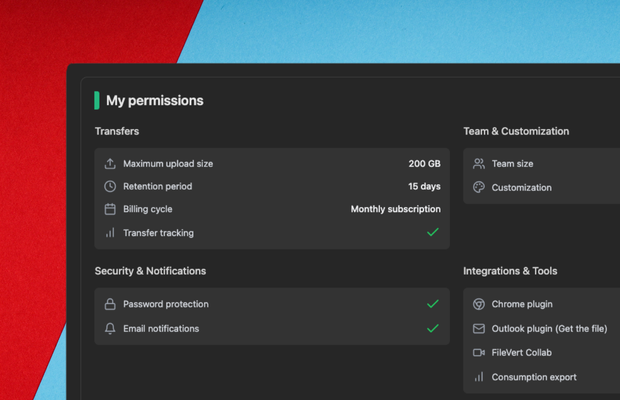
Volume et taille des fichiers
FileVert accepte des fichiers jusqu'à 200 Go en version premium (2 Go gratuit immédiat). Le système d'upload multipart intelligent divise automatiquement les gros fichiers en chunks de 20-100 MB pour une transmission optimale. Reprise automatique en cas d'erreur réseau.
- 2 Go gratuit sans inscription
- Jusqu'à 200 Go en version premium
- Upload multipart automatique (chunks 20-100 MB)
- Reprise automatique en cas d'interruption
Comment votre client télécharge-t-il les fichiers ?
Découvrez tous les modes de téléchargement disponibles : ZIP, partiel, API/FS directe avec structure préservée, et page personnalisée avec branding.
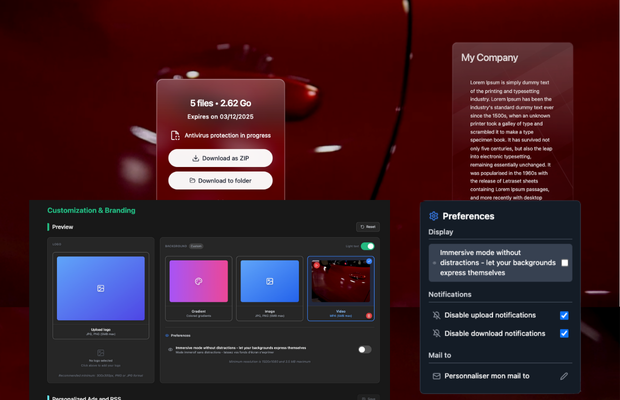
Page personnalisée avec branding
Personnalisez complètement la page de téléchargement : logo de votre entreprise, couleurs de votre charte graphique, vidéo de fond personnalisée (max 5MB), messages promotionnels. Mode immersif activable depuis l'accueil pour laisser place nette à votre vidéo ou votre branding personnalisé. Expérience 100% cohérente avec votre identité de marque, zéro publicité concurrente.
- Logo et couleurs personnalisés
- Vidéo de fond (max 5MB, MP4 optimisé)
- Mode immersif activable depuis l'accueil
- Messages promotionnels personnalisés
Guides complémentaires pour vos transferts sécurisés
Découvrez nos autres guides pour optimiser vos envois de fichiers
Envoyer en toute sécurité
Protégez vos fichiers avec un transfert sécurisé
Guide complet : Envoyer des gros fichiers
Toutes les méthodes pour transférer des fichiers volumineux
Branding personnalisé
Personnalisez vos pages de téléchargement avec votre logo et vos couleurs
Envoyez vos fichiers protégés à vos clients
FileVert vous garantit une sécurité maximale avec chiffrement AES-256, protection par mot de passe et options de branding personnalisé.
Questions fréquentes
Réponses aux questions courantes sur l'envoi de fichiers protégés