FileVert + Outlook: the perfect workflow
Official extension, native integration. Send large files directly from Outlook.
Keep your Outlook workflow, eliminate its limits. 1-click installation, files up to 200 GB, enhanced security.
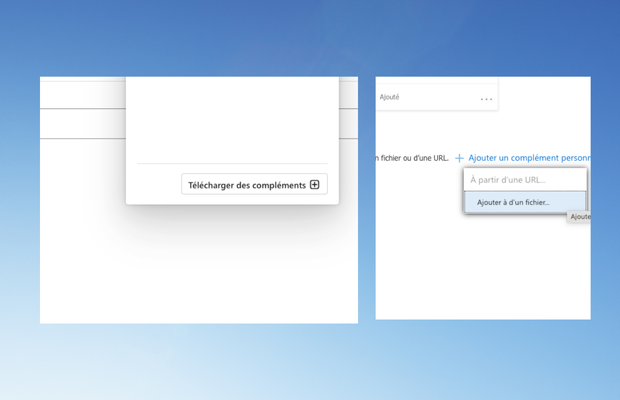
Access add-ins
Open Outlook, click on the "File" tab at the top left or "Settings" at the top right. In the options window, choose "Add-ins" or "Manage add-ins"
- Open your Outlook application
- Click on "File" (top left) or "Settings" (top right)
- Choose "Add-ins" or "Manage add-ins"
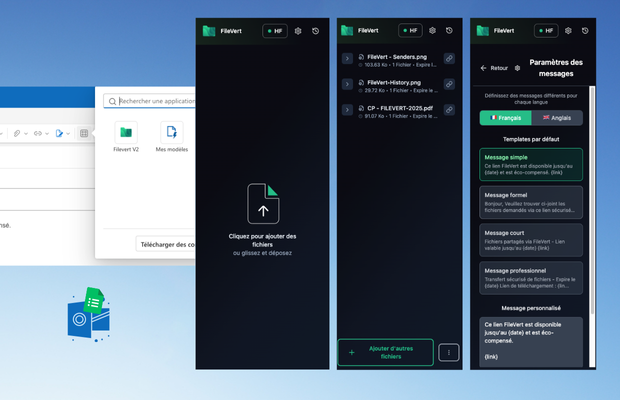
Access FileVert
Open a new message in Outlook. You should see the FileVert icon in your message toolbar
- Open Outlook
- Create a new message
- The FileVert icon appears in the toolbar
FileVert add-in features
Complete integration for optimized workflow
Direct upload from Outlook
Drag and drop your files directly in the Outlook interface
Unified workflow, no application switching
Automatic link insertion
The FileVert link is automatically inserted into your email
Zero manual manipulation, customizable template
Memorized configuration
Your preferences (duration, security) are saved
Time savings, sending consistency
Integrated notifications
Receive download notifications in Outlook
Centralized tracking, accessible history
Centralized management
Access all your transfers from the FileVert panel
Overview, post-send control
Inherited security
Benefit from combined Outlook + FileVert security
Double protection, complete audit trail
Detailed compatibility by Outlook version
Detailed compatibility by Outlook version
FileVert adapts to your Outlook environment
Since 2024, Microsoft has removed direct URL installation. Installation now requires downloading an XML file via Outlook's native menu.
Outlook Web (Office 365)
RecommendedComplete extension
Fonctionnalités :
- Direct installation
- Integrated interface
- Automatic synchronization
Limitations :
- •Internet connection required
Installation : Office 365 Store
Outlook Desktop (Windows)
CompatibleExtension + workflow
Fonctionnalités :
- Native extension
- Drag & drop
- Complete integration
Limitations :
- •Windows 10+ required
- •Outlook 2016+ minimum
Installation : Microsoft Store
Outlook Mac
ManualNot compatible
Fonctionnalités :
- Optimized workflow
- Quick copy-paste
- Keyboard shortcuts
Limitations :
- •No native extension
- •2-step workflow
Installation : Manual workflow
Outlook Mobile
Mobile-firstNot compatible
Fonctionnalités :
- FileVert mobile app
- Native sharing
- Optimized interface
Limitations :
- •Separate apps
- •Manual transfer
Installation : App Store / Play Store
FAQ about Outlook integration
Everything you need to know to install and use FileVert with Outlook
Outlook + FileVertThe perfect duo
Keep Outlook, eliminate its limits. Official extension, optimized workflow, unlimited files.